- Companions -
An animal companion fights alongside the player and makes its own decisions.
The companion also follows instructions given to it by the player.
Controlling the Companion
Change Companion's Attack Mode
Press Spacebar while the companion is attacking enemies,
and the companion will return to the player because its mode
has been set to INACTIVE. Also, pressing Spacebar while the
companion mode is INACTIVE
changes the mode to ACTIVE,
and the companion attacks enemies independently.
If your version is 1.004.000 or higher, Companion HP can be
recovered while the mode is INACTIVE. |
Companion Dash
To activate the dash attack, point the cursor in the direction to
dash and right-click
while pressing the TAB key on the keyboard.
Your companion can dash attack enemies if there are enemies
in front of it. (Available in Episode 2 and later) |
Companion Jump
To tell your companion to jump, point the cursor on a location or
enemy you want it to land on,
then left-click while pressing the
TAB key on the keyboard. |
Let Companion Pick Up Items
To have your companion pick up items, move the cursor to the
item you want to pick up,
hold the TAB key and left-click on it. |
Push a Button/Pull a Switch
In order to open doors or activate certain parts of towns or ruins,
you may have to find and push a switch or button.
To have the companion open doors or activate certain parts of
towns or ruins, left-click on the button/switch while pressing TAB key. |
Increase Companion's Level
A companion's level can increase depending on the number
of monsters that the player and the companion have defeated.
If the level of the player doesn't increase, the companion level
stays the same too.
Exchange Companions
The player can swap companions in towns and other places.
The level of a companion that isn't accompanying the player
will stay the same until the companion is active again.
However, companions cannot be exchanged in online mode.
Companion's Status
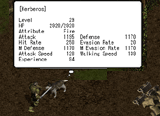 |
Your companion also has its own status parameter and the player
can check its status. To check your companion's status, place the
cursor on your companion and left-click while pressing TAB on
the keyboard. Companion status can only be checked when the
companion is still. |