- Items and Equipment -
There are basically two types of items:
items that enhance a players health and ability to injure enemies (such as
tablets and capsules)
and items used to equip the player and strengthen the player's
ability to attack and defend himself in battle (such as armaments and
weapons).
There are some items that only your companion can use.
There are also some items which offer special abilities.
Items That Enhance Health and Abilities
To use items such as capsules and tablets, open the Item screen
and right-click on the item that you want to use.
Once you use it, the item will disappear from the Item screen.
Equipment Items
In order to equip your player with armor, weapons, or accessories, open the Item screen and
left-click on the item you wish to use. Move the cursor to the appropriate body part
or space in the Item screen and left-click.
Accessories, like rings, can be equipped to the four accessory spaces next to the
Warehouse Transfer Box icon.
Durability
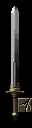
| Each Equipment item has a durability level. Durability decreases each time you use the item or it is damaged. Once durability becomes 0, the item is no longer effective. Before durability becomes 0, players need to repair the item. |
 |
Identify Items
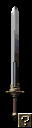
| There are some items that have ? icons next to them. This means that the nature of the item is unclear, and the player needs to ask a merchant to identify the item. Once the item is identified, you can see the details of the item and can use it. |
 |
Arms Requiring Two Hands
Episode 3 and later
There are some arms that can only be used effectively with
two hands.
When these arms are used, a shield can no longer be used at the same time.
If a player has already been equipped with a shield, it will appear
semi-transparent.
Change Equipment
| Players can set two different sword and shield configurations on the Item screen. Players can switch back and forth between these configurations by clicking on the 'I' or 'II' Change Equipment buttons on the Items screen or by pressing the Shift + CapsLock key on your keyboard. |
 |
|
**Also, if players right-click on the 'II' icon, the Change Equipment looks like the picture to the right. |
 |